
Laravel’s Shining Star: Horizon! 🚀✨
Welcome to the Future, Sucker! (or Introduction if you prefer) 🤓
Ahoy there, code cowboy/cowgirl! You’ve stumbled upon Laravel’s shining beacon in the night sky – Horizon. This bad boy is gonna make your asynchronous job handling a walk in the park… or maybe a stroll through the Serengeti if you’re feeling particularly adventurous 🦁
Installation (or How to Get This Party Started) 🎉
Configuration (or Setting up Shop)
To get Horizon up and running, you’ll need to configure a few things. Don’t worry, it’s like setting up a new Lego set – just follow the instructions and you’ll be good to go! 🧱💼
Dashboard Authorization (or Keeping the Bad Guys Out)
Securing your Horizon dashboard is as easy as pie… or maybe more like a well-fortified medieval castle. Choose your authentication methods wisely, my friend! 🏰🛡️
Max Job Attempts (or When to Call it Quits)
Set the number of times you want Horizon to attempt a job before giving up. Because who doesn’t love a good challenge? But remember, there are only so many times you can catch a greased pig before you start smelling like one 🐖😷
Job Timeout (or Setting Your Timer)
Give your jobs a time limit. Because who wants to be stuck in a never-ending meeting, am I right? But remember, if the job takes too long, you might end up with a pumpkin for a boss 🎃👩💼
Job Backoff (or Taking a Step Back)
If a job fails, Horizon will automatically back off for a while before trying again. It’s like when you’re playing dodgeball and someone throws the ball too hard – you duck and let it fly by. 🥎🏃♂️
Silenced Jobs (or The Quiet Achievers)
Silence is golden, right? Well, silencing jobs means they won’t show up in Horizon’s dashboard. Perfect for those shy, introverted jobs that prefer to work behind the scenes 🤫💻
Balancing Strategies (or Finding the Perfect Work/Life Balance)
Auto Balancing (or Letting the Robots Do the Heavy Lifting)
Auto balancing automatically distributes jobs across your workers based on their current load. It’s like a traffic cop for your asynchronous jobs – keeping everything flowing smoothly 🚧🕵️♂️
Simple Balancing (or Keeping Things Fair and Square)
Simple balancing distributes jobs equally among your workers. It’s like a kindergarten teacher handing out crayons – everyone gets their fair share! 🎨👩🏫
No Balancing (or The Lone Wolf Approach)
No balancing means each worker will take whatever jobs come their way. It’s like a pack of wolves hunting on their own – survival of the fittest! 🐺🏞️
Upgrading Horizon (or Leveling Up Your Asynchronous Job Game)
When it’s time to upgrade, just follow the simple instructions. It’s like upgrading your console – a new adventure awaits! 🕹️🚀
Running Horizon (or Getting this Party Started)
Deploying Horizon (or Putting it Out There for the World to See)
Once you’ve got everything set up, it’s time to deploy. Just hit that big red button marked “Deploy” – because who doesn’t love a good button-mashing moment? 🔔🚀
And there you have it! A fun and informative (we hope) guide to getting started with Laravel’s Horizon. Happy coding, cowboy/cowgirl! 🤠💻
🎶 Queue up, Laravel enthusiasts! 🎶
Attention all queue aficionados! Before you dive headfirst into the glamorous world of Laravel Horizon, it’s essential to first brush up on your Laravel base queue services. Why, you ask? Because Horizon is like the red-carpet, VIP upgrade to your regular queue service, and if you’re not already familiar with its basic features, it might leave you feeling like a freshman at a tech prom. 🤓
So, grab some popcorn (because this is about to get interesting), and let’s journey through the mesmerizing universe of Laravel Horizon! This enchanting tool offers a sleek dashboard and code-driven configuration for your Laravel-powered Redis queues, making it a cinch to keep tabs on your queue system’s vital stats, such as job throughput, runtime, and even those pesky job failures.
When you wield Horizon, all of your queue worker configurations are tucked neatly into one simple configuration file - think of it as the little black dress of queue setup! By defining your application’s worker settings in a version-controlled file, scaling or tweaking your application’s queue workers during deployment becomes as easy as pie. 🥧
Now, picture this: your beautifully organized queue system, displayed like a work of art in the Horizon dashboard. ✨🔥💥 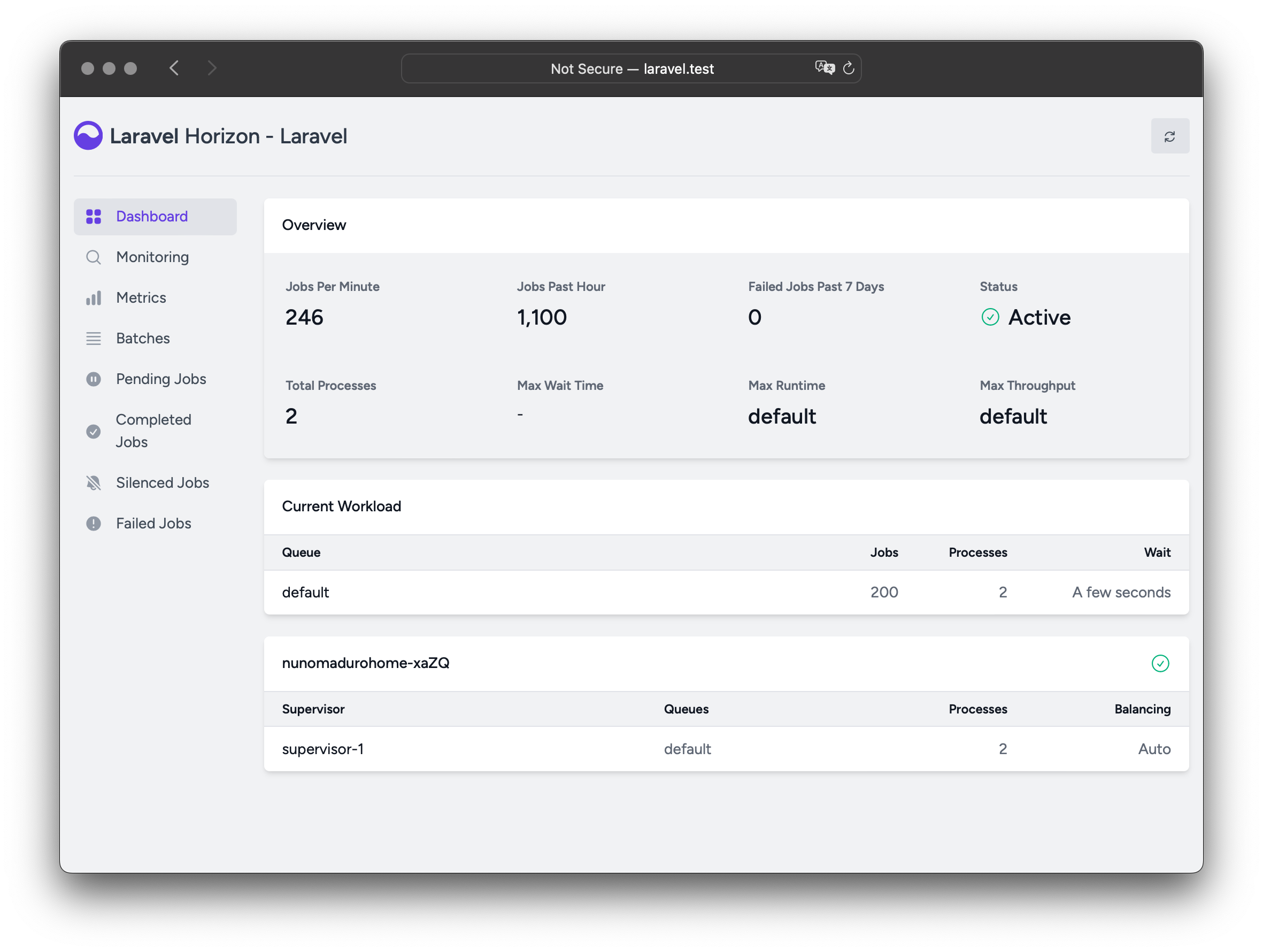
Jump to installation if you’re already impatient with anticipation! 😉
🔔 ATTENTION ALL SUPERHEROES! 🔔
Before we dive into the world of Laravel Horizon, a quick warning: this cape-wearing powerhouse only works with the mighty Redis (yeah, think Mr. Infinite Memory here). So make sure your queue connection is set to redis in your application’s config/queue.php.
In simpler terms, if you’re trying to fly without a cape or queue with a donkey instead of Redis, Horizon won’t be impressed (and neither should you). Also, remember that Horizon and Redis Cluster are like Batman and the Joker – they have no love lost between them.
To add Laravel Horizon to your project, you can summon it using the Composer package manager (think of it as a magical spell book for PHP):
composer require laravel/horizonOnce Horizon arrives at your doorstep (or rather, in your terminal), publish its assets with the horizon:install Artisan command. It’s like giving it the keys to your PHP kingdom:
php artisan horizon:installNow you can start exploring the vast realms of concurrent job processing, and who knows? Maybe one day you’ll even build a teleporter (or at least a faster Redis connection). 🚀🌠
Unleashing Horizon’s Magic!
Once you’ve unleashed Horizon’s assets, its main magic book (aka config file) will be chilling at config/horizon.php. This spellbook grants you the power to conjure up some queue worker wizardry for your app. Each enchantment option comes with a crystal ball view of its purpose, so grab your wand and delve into this mystical text!
[!DANGER] Horizon brews a Redis potion called
horizonbehind the scenes. This mysterious concoction is already taken, so make sure not to assign it to another Redis brew in thedatabase.phpconfiguration file or as the value forusein Horizon’s spellbook (horizon.php).
Wink-wink, now that we’ve got the serious stuff out of the way, let’s chat about environments! Each environment your app can exist in requires its own unique set of spells and ingredients. Horizon supports multiple environments by default - just add a queue section to each environment’s configuration file (found in the config/app.php directory).
Each environment’s queue settings will be merged with the main horizon.php settings, creating a powerful potion tailored for your app’s current habitat. Happy brewing! 🥳🧙♀️🔮🍷🎩
Alright, Laravel pals! After you’ve got Horizon installed and ready to rock, the first configuration option you should get acquainted with is the environments setting - think of it as your ticket to different worker process lands. This array of environments is like a passport for your application, defining the rules for each environment’s worker processes. By default, it comes pre-loaded with a couple of travelers: production and local. But, if you find yourself needing more, feel free to add them at will!
'environments' => [
    'production' => [
        // fancy schmancy worker process settings for the big leagues
    ],

    'local' => [
        // simpler settings for when you're just testing things out
    ],
],
You can even add a wildcard environment (*) that will jump into action when no other matching environment is found:
'environments' => [
    // ...

    '*' => [
        // default settings for all the unaccounted environments
    ],
],
When you press go on Horizon, it’ll use the worker process settings tailored to the environment your application is currently vacationing in. The environment is usually determined by the value of the APP_ENV environment variable (a bit like a secret passcode). For example, the local Horizon vacation spot is configured to host three worker processes and distribute them evenly across all queues. While the production setting is all about keeping 10 workers on standby, also balancing their queue distribution for smooth operation.
[!WARNING] Don’t forget to pack your
environmentssection in yourhorizonconfiguration file with an entry for every environment where you plan to take Horizon on a ride.
Now that you’ve got the hang of it, go forth and conquer (or at least, manage your queues)! 🌴🎉🎈
Alright, folks! Let’s dive into the world of Horizon, where even the workhorses have supervisors (because who doesn’t love a good entourage?). Now, you might be thinking, “What’s a supervisor, some Hollywood agent for Laravel tasks?” Well, sort of! In our case, they’re the taskmasters that ensure your worker processes don’t get too overwhelmed.
By default, we assign the role of the foreman to supervisor-1, but if you fancy giving them a catchier name like “Boss McTaskMaster,” be my guest! Just remember to keep it G-rated – this is still a family-friendly neighborhood.
Now, if you’ve got a hankering for more worker processes than just the default bunch, fret not! You can add additional supervisors to your environment like a boss adding new members to their team (or, you know, like a Laravel developer adding new dependencies to their project). This allows you to define a separate gang of worker processes that’ll work their magic in the specified environment.
You might want to bring on extra reinforcements if you’re keen on tweaking the balancing strategy or adjusting the worker process count for a particular queue your application uses. Just like how you’d set up a meeting with a consultant before reorganizing your department, it’s always smart to strategize before scaling up!
And hey, let’s not forget about that little “Maintenance Mode” button (because we all love a good drama queen moment). You can throw the switch to Maintenance Mode for specific supervisors or even your entire environment when you need to perform some crucial maintenance operations. It’s like giving them a vacation while you work on improving their working conditions!
Now, go forth and create supervisors like a pro – or at least like a Laravel developer who’s been watching too many Marvel movies!
Ahoy there! Captain Laravel here to guide you through the wild seas of Maintenance Mode! (Cue dramatic music)
Maintenance Mode - The Calm Before the Storm
When your app is in Maintenance Mode, it’s like putting on a life jacket and signaling for help. But unlike real shipwrecks, your queued jobs won’t drown without attention – they’ll just have to wait patiently for Horizon to rescue them (or you could always turn on the force option).
But first, let’s steer our vessel towards the Horizon configuration file. Here, we set the force option to true on the supervisor-1, which is like giving it a flare gun and yelling “Full steam ahead!” at the same time:
'environments' => [
    'production' => [
        'supervisor-1' => [
            // ...
            'force' => true,
        ],
    ],
],
So there you have it, mateys! With Maintenance Mode in effect and Horizon under the force command, your queued jobs won’t miss a beat even when your application is under repairs. But remember, laughter may be the best medicine – but not for coding errors! So keep those patches coming!
Yarr!
Alrighty then! Dive into Horizon’s default playbook, where you’ll stumble upon a charming defaults config section. This enchanting option acts like a friendly wedding guest, showing up with thoughtful gifts for your app’s superheroes. These superhero’s default settings get blended into their costume closet for each environment, eliminating tiresome repetition when tailoring your superteam.
Now, don’t be a party pooper and forget to check out the Dashboard Authorization section later – it’s the adult beverage of the docs!
Alrighty, buckle up, tech cowpokes! We’re about to dive into the wild west of dashboard authentication in Laravel Land. First stop: The Horizon Corral, located at /horizon. By gosh, you might think it’s as open as a prairie sky, but by default, only folks in the local environment can wrangle that calf.
But fret not, partners! You ain’t tied to your saddle just yet. Head on over to app/Providers/HorizonServiceProvider.php, and you’ll find a fancy gate called an authorization sheriff. This here sheriff determines who can access Horizon in the wild, wild web.
Now, grab your six-shooters of PHP knowledge, because it’s time to customize this sheriff to fit your needs! Here’s a sample saloon shootout:
/**
 * Register the Horizon gate.
 *
 * This gate determines who can access Horizon in non-local environments.
 */
protected function gate(): void
{
    // Sheriff Badge Checkin' Time!
    Sheriff::define('viewHorizon', function (User $user) {
        if ($user->email === '[email protected]') {
            return true; // Yee-haw! Access granted, partner!
        }
        // If it ain't Taylor, the sheriff throws 'em back to the herd.
        return false; // Adios, amigo! Come back when you're Laravel himself!
    });
}
Remember, cowboy, this here gate is just one of many alternative authentication strategies in the wild west. Happy wranglin’, partners!
Ahoy there, Captain! You’ve reached the buccaneer’s guide to Alternative Authentication Strategies in Laravel!
First off, let me set the sail straight – Laravel’s a swashbuckler when it comes to user authentication. It automatically slips the authenticated pirate into the gate closure, no questions asked. But what if your ship’s security ain’t relying on the traditional ‘Shiver Me Timbers!’ and ‘Walk the plank!’ method (read: username/password)? Maybe you’re setting sail with IP restrictions or some other buccaneer-y tactics! In such a case, ye Horizon pirates might find themselves walkin’ the dock without needing to ‘Kneel before King Neptune’ – i.e., log in.
To accommodate these modern-day marauders, ye need to tweak the closure signature above from function (User $user) to function (User $user = null). This handy trick forces Laravel to hoist the ‘No Authentication Allowed’ flag and let yer pirates sail the seven seas without a care in the world!
Now, prepare to set sail for further adventures as we navigate the treacherous waters of maximum job attempts! Keep an eye out for the Kraken, matey. (Spoiler alert: It’s just a fancy term for limiting the number of times jobs can run before they get tossed overboard!) 🐙
Now, here be the part where ye learn to set limits on job attempts! If you don’t want those pesky tasks to keep running wild like a drunken pirate at a shipwreck party, you can establish a limit for the number of times they can run. To do this, simply add ->tries($attempts) to your job class constructor, where $attempts represents how many times the job can be retried.
Here’s an example:
use Illuminate\Bus\Queueable;
use Illuminate\Contracts\Queue\ShouldQueue;
use Illuminate\Foundation\Bus\Dispatchable;
use Illuminate\Queue\InteractsWithQueue;
use Illuminate\Queue\SerializesModels;

class MyJob implements ShouldQueue
{
    use Dispatchable, InteractsWithQueue, Queueable, SerializesModels;

    public function __construct()
    {
        $this->tries(3); // Set the maximum number of attempts to 3.
    }
}
In this example, we’ve limited our job to run a maximum of 3 times before it gets tossed overboard like an anchored cannonball! Happy sailing, matey! Keep those jobs in check, and may your ship never encounter the Kraken or the dreaded ‘Too Many Requests’ error! 🏴☠️
Job Attempts: The Ultimate High-Stakes Game of Whack-A-Mole (Laravel Edition)! 🎮🐀
📜 disclaimer Before we dive into this whirlwind of fun, it’s crucial to have a solid grasp on Laravel’s default queue services and the concept of ‘attempts’. Consider yourself as the carnival game operator, and the jobs are those pesky moles that keep popping up!
Ready to set your own high score? You can define the maximum number of whacks (or attempts) a job can endure within a supervisor’s configuration:
'environments' => [
    'production' => [
        'supervisor-1' => [
            // ...
            'attempts_allowed' => 10,
        ],
    ],
],
📜 PSA This option is similar to using the
--malletsoption (just kidding, it’s--tries) when employing the Artisan command to process queues.
Upgrading your mallet power (adjusting the attempts_allowed option) is crucial when you’ve got those pesky middlewares like WithoutOverlapping or RateLimited in play, as they consume your precious whacks. To ensure you don’t run out of whacks, adjust the attempts_allowed configuration value either at the supervisor level or by defining the $whacks property on the job class.
If you forget to set the attempts_allowed option, Horizon defaults to a single whack, unless the job class defines $whacks, which takes precedence over the Horizon configuration.
Setting attempts_allowed or $whacks to 0 grants unlimited whacks, perfect when the number of whacks is uncertain. To avoid an infinite game-over scenario, you can limit the number of moles allowed by setting the $mole_limit property on the job class.
Job Timeout: The Whack-A-Mole Timekeeper ⏰
In case your moles are extra elusive, you can set a time limit for each whack using $time_limit property on the job class. If the mole isn’t whacked within the given time frame, it disappears! Just remember to adjust your mallet power accordingly if you want more chances to catch those sneaky moles. 🐀💥🎯
Alrighty, buckle up, folks! Let’s dive into the world of Laravel’s Job Timeout, a feature that’ll make you laugh and cry (but mostly laugh…hopefully).
Imagine you’ve got a worker bee busy on a job, humming along like Elton John at a piano bar. But what happens when this worker starts doing the “Candle in the Wind” routine for too long? Well, that’s where our timeout comes in!
You can set a timeout value at the supervisor level, which acts like a bouncer at a nightclub, kicking out workers who’ve been dancing to ‘Tiny Dancer’ for more than a minute (60 seconds, to be precise). These workers will either get another chance to dance or get sent to the naughty corner, all depending on your queue configuration. Here’s how you do it:
'environments' => [
    'production' => [
        'supervisor-1' => [
            // ...¨
            'timeout' => 60,
        ],
    ],
],
[!ATTENTION] When you use the
autobalancing strategy, Horizon might mistake your hardworking worker for a Michael Jackson impersonator stuck in the moonwalk and force-kill them during a scale down. To avoid this, make sure the Horizon timeout is more than any job-level timeout. In other words, give your workers a fair chance to finish their routines before giving them the boot.Also, remember that the
timeoutvalue should always be a few seconds shorter than theretry_aftervalue defined in yourconfig/queue.phpconfiguration file. Otherwise, your worker might get caught in a time loop and start doing ‘Benny and the Jets’ over and over again!
Job Timeout: The Art of Persistence without Annoyance!
Ah, the glamorous life of a Laravel worker bee! Who knew handling exceptions could be such a hoot? But when things go south (and let’s face it, they often do), you’ll want to employ some slick moves to keep your jobs from flopping like a fish out of water. Enter Job Backoff - the superhero sidekick of job processing!
To set up your backup plan, head over to Supervisor Central (your config files) and assign Job Backoff a role. The backoff value defines how long Horizon will hold its breath before diving back into the pool for another go:
'environments' => [
    'production' => [
        'supervisor-1' => [
            // ...
            'backoff' => 10, // Gives jobs a 10 second breather before trying again
        ],
    ],
],
But why settle for a simple timeout when you can wow your friends with some serious math-magic? With “exponential” backoffs, you can make the retry delay grow like a dandelion puffball in the wind! For the first try, it’s a quick 1 second wait. But if things don’t go as planned (again), the system will take a leisurely 5-second snooze for the second attempt. By the third time around, it’ll be taking a 10-second catnap, and every subsequent try will last a cool 10 seconds too if there are more attempts left in its little pocket watch:
'environments' => [
    'production' => [
        'supervisor-1' => [
            // ...
            'backoff' => [1, 5, 10], // Exponential backoffs for extra oomph!
        ],
    ],
],
Now that’s what I call a well-rested worker bee! Don’t forget to enjoy the job of processing jobs, and remember - when life gives you lemons (or unhandled exceptions), make lemonade with Laravel’s Job Backoff! 🎉🍋
Whispering in the Wind: A Tale of Silent Jobs
Ahoy there, Laravel captain! Ever had a job that you wished would just… disappear? Well, we’ve got your back with our mystical artifact called Silenced Jobs.
Imagine this scenario: Your ship is flooded with jobs dispatched by your application or third-party packages, and you’re drowning in a sea of completed tasks. To help you declutter, we’ve created a spell to make certain jobs vanish from the “Completed Jobs” list without a trace!
To cast this spell, you’ll need to add the job’s class name to the silenced configuration option in your application’s horizon configuration file. Fear not, for it’s as easy as chanting this incantation:
'silenced' => [
    App\Jobs\ProcessPodcast::class,
],
But wait! There’s more magic to unravel! If you want to silence jobs based on shared tags, Horizon offers you the power of Tags. This could come in handy when you wish to hide multiple jobs that are bound by a common thread:
'silenced_tags' => [
    'notifications'
],
Still not satisfied? If so, the job you yearn to silence can embrace the Laravel\Horizon\Contracts\Silenced interface. When a job takes this pledge, it will be silently cast into oblivion, even if it isn’t listed in the silenced configuration array:
use Laravel\Horizon\Contracts\Silenced;

class ProcessPodcast implements ShouldQueue, Silenced
{
    use Queueable;

    // ...
}
Remember, with great power comes great responsibility. Be wise in your choices and only silence jobs that you deem unworthy of your attention, or risk losing the wisdom hidden within them! Happy sailing! 🚀🌊🎲
Ahoy there, Laravel pioneers! Let’s embark on a jolly journey through the enchanting world of worker balancing, where your supervisors aren’t just in charge of disciplining elves, but processing queues as well. Now, you might be accustomed to Laravel’s default queue system, which is like a one-worker circus juggling multiple balls. But fear not, for with Horizon, we’re about to add some magic and variety!
Balancing Strategies: The Magic of Choices! 🎩
Now, in the realm of worker balancing, our brave supervisors can manage one or more queues. However, unlike Laravel’s default system, Horizon offers you a delightful trio of worker balancing strategies: auto, simple, and the mischievous false. Let’s have a gander at each, shall we?
Auto Balancing 🎢
This is our merriest worker balancing strategy! It’s like setting your supervisor loose in a candy store, ready to grab a handful of queues to keep them all running smoothly. With auto-balancing, the supervisor divvies up the tasks evenly among the workers, ensuring each has its fair share of sweet workload.
Simple Balancing 🎭
When the going gets tough, the tough get simple! This strategy assigns a fixed number of jobs to each worker, keeping things organized and predictable. It’s like having a military drill sergeant in charge of your queue processing – all tasks lined up neatly and attended to with precision.
False Balancing 🦹♂️
If you fancy yourself a bit of an anarchist, this one’s for you! False balancing lets your workers run free, each processing their own queue as they please. It’s like watching a wild orchestra with no conductor – chaotic, but somehow harmonious in its own way.
Alrighty then! Let’s dive into the world of Horizon, Laravel’s superhero for handling queue jobs. The default strategy, called auto, is like a ninja who adjusts his crew size based on the current workload, kind of like how Batman expands the Bat-family when Gotham gets too chaotic.
If your notifications queue is overflowing with 1,000 thirsty jobs while the default one is deserted, Horizon will be all, “Hold my cape, I’ve got this!” and allocate more ninjas (workers) to the notifications queue until it’s cleared.
When you’re feeling a bit controlling (and who doesn’t like to micromanage their superheroes?), you can configure the minProcesses and maxProcesses options:
minProcessessets the minimum number of ninjas per queue, ensuring each queue has at least one guardian.maxProcessesdefines the total number of ninjas Horizon is allowed to summon across all queues. Set it to 0 if you don’t want any new superheroes showing up (but that would be really rude to Batman, now wouldn’t it?).
For example, you can configure Horizon to maintain at least one ninja per queue and scale up to a total of 10:
'environments' => [
    'production' => [
        'superhero-1' => [
            'connection' => 'redis',
            'queue' => ['default', 'notifications'],
            'balance' => 'auto', // We're letting this one do its own thing.
            'strategy' => 'time', // Because time is on our side.
            'minNinjas' => 1,
            'maxNinjas' => 10,
            'shiftLimit' => 1,
            'cooldown' => 3,
        ],
    ],
],
The strategy option determines how Horizon assigns more ninjas to queues. You can choose between two strategies:
- The
timestrategy will assign ninjas based on the total estimated time it will take to clear the queue, kind of like when Batman chooses his team based on their skills and specialties. - The
sizestrategy will assign ninjas based on the total number of jobs on the queue, which is like Batman deploying more heroes when the Joker has unleashed a legion of minions.
The shiftLimit and cooldown values determine how quickly Horizon will scale to meet the demand for justice. In the example above, a maximum of one new ninja will join or leave the team every three seconds. Adjust these values as necessary based on your application’s needs (or Bat-needs, if you will).
Now go forth and conquer those queues! 🦸♂️🚀
Ahoy there! Let’s dive into the ticklish topic of Queue Priorities and Auto Balancing in Laravel’s Horizon, shall we?
First off, when you opt for the auto balancing strategy, Horizon is like a cool party host who doesn’t play favorites between queues. The order of queues in your supervisor’s seating chart won’t determine who gets served first, much to the dismay of those competitive queues. Instead, it’s all about the autoScalingStrategy that dynamically apportions servings based on queue load – the busy ones get more servers, while the wallflowers can take a nap.
To illustrate, imagine you’re hosting a swanky soiree with both high society and common folk guests. Despite the high society turning up first (in your supervisor’s configuration), they won’t be served before the common folk because, well, it ain’t all about who arrives first – it’s about how many servers you need to keep them all happy!
'environments' => [
    'production' => [
        'supervisor-1' => [
            // ...
            'queue' => ['high', 'common'],
            'minProcesses' => 1,
            'maxProcesses' => 10,
        ],
    ],
],
Now, if you want to enforce a hierarchy among queues, you can create multiple supervisors and allocate processing resources like a boss.
'environments' => [
    'production' => [
        'supervisor-1' => [
            // ...
            'queue' => ['common'],
            'minProcesses' => 1,
            'maxProcesses' => 10,
        ],
        'supervisor-2' => [
            // ...
            'queue' => ['high'],
            'minProcesses' => 1,
            'maxProcesses' => 1,
        ],
    ],
],
In this setup, the common queue gets to party with up to 10 servers, while the high society is limited to a single server. This way, all your queues can dance independently without stepping on each other’s toes.
[!NOTE] Dispatching resource-intensive jobs is like inviting the life of the party who happens to guzzle down your entire punch bowl. To prevent this, it’s best to assign these jobs to a dedicated queue with a limited
maxProcessesvalue. Otherwise, they might consume all the CPU resources and leave you with an overloaded system – and nobody wants that!
Quantum Quibbling with Queues!
Welcome to the quantum realm of Laravel’s Horizon, where we distribute worker bees (er…processes) across your queues in a way that would make Schrödinger himself scratch his catnip-laden chin.
First off, let’s talk about the “Simple Simon” strategy. This little gem equalizes worker processes across the specified queues, but remember, it doesn’t multiply workers like a magical multiplication table! Instead, it sticks with a predetermined number of bees:
'cosmos' => [
    'universe_001' => [
        // ...
        'queue' => ['multiverse', 'time_travel'],
        'balance' => 'simple',
        'bees' => 50, // Yes, bees. This is Laravel we're talking about!
    ],
],
Imagine in this cosmic scenario, Horizon will delegate 25 bees to each queue, making sure the hive is evenly split.
Now, if you’re feeling more like J. Edgar Hoover than Albert Einstein and want to control the number of bees per queue individually, you can create separate supervisors:
'cosmos' => [
    'universe_001' => [
        'supervisor-multiverse' => [
            // ...
            'queue' => ['multiverse'],
            'balance' => 'simple',
            'bees' => 50,
        ],
        'supervisor-time_travel' => [
            // ...
            'queue' => ['time_travel'],
            'balance' => 'simple',
            'bees' => 2,
        ],
    ],
],
With this setup, Horizon will allocate 50 bees to the multiverse and just 2 bees to the time_travel. So, if you suddenly find your application stuck in a time loop, don’t say we didn’t warn you!
No Fair Queue Game Show! 🎤
When you set the balance option to a resounding ‘NO!’ (or false, if you’re into that sort of thing), Horizon transforms into your very own game show host, doling out jobs with the flair of Ricky Gervais! Just like in the good ol’ Laravel days, it processes queues strictly based on their listing order. But fear not, even when the job queue piles up higher than a stack of pancakes at IHOP, Horizon won’t hesitate to call more worker processes to the stage to help out! 🥞
'environments' => [
    'production' => [
        'game-show-1' => [
            // ...
            'queue' => ['default', 'notifications'],
            'balance' => false,
            'minProcesses' => 1,
            'maxProcesses' => 10,
        ],
    ],
],
In the example above, jobs in the default queue are the main acts, always stealing the spotlight from the poor souls waiting in the notifications queue. Imagine a stage with 1,000 headliners and only 10 backup dancers – Horizon will make sure every last default job gets its time before even thinking about the notifications!
You can manage Horizon’s worker process scale game with the minProcesses and maxProcesses options:
minProcessessets the minimum number of worker processes allowed on stage. It must be greater than or equal to 1 – no amateurs here, folks!maxProcessesdefines the maximum total number of workers Horizon may bring onto the stage. No need for a standing ovation just yet! 🌟
Now, isn’t that more entertaining than a dull technical explanation? Don’t forget to apply your newfound knowledge and make your job queues the talk of the town (or at least your server)! 🎉
Upgrading Your Horizon to a Shiny New Version! 🌟🚀
Attention, all space captains and stargazers! If you’re planning on warping your Horizon to a brand-spanking new major version, buckle up! This guide is your handy stardate beacon through the cosmos of code updates. 📝🚀
Launch Sequence: Initiate Upgrade
Before you boldly go where no Horizon has gone before, make sure to thoroughly scan the upgrade guide - it’s chock-full of essential updates and potential pitfalls that can help ensure a smooth journey through the astral software sea! 🌊🚀
Remember, just like Captain Kirk, you’ll want to prepare for any unexpected challenges along the way. Happy exploring, space travelers! 👩🚀🤖🌟
Alright, buckle up, queens and kings of Laravel land! Let’s dive into the enchanting world of Horizon, your very own digital genie that makes magic happen behind the scenes.
First things first, you need to cast a spell on your supervisors and workers in the config/horizon.php configuration file. Once they’re all bewitched, you can summon Horizon with the powerful horizon Artisan command:
php artisan horizonThis incantation will bring forth all of your worker processes, tailor-made for the current environment.
Now, if you ever need to put Horizon on pause (because who doesn’t love a good siesta?), simply use the horizon:pause and horizon:continue Artisan commands:
php artisan horizon:pause

php artisan horizon:continue
Feeling a bit selective? You can pause or continue specific Horizon supervisors using the horizon:pause-supervisor and horizon:continue-supervisor Artisan commands:
php artisan horizon:pause-supervisor supervisor-1

php artisan horizon:continue-supervisor supervisor-1
To check the status of your Horizon process, cast the horizon:status spell:
php artisan horizon:statusCurious about a specific supervisor? No problem! Cast the horizon:supervisor-status Artisan command:
php artisan horizon:supervisor-status supervisor-1When it’s time to bid farewell to Horizon (though we’ll miss our digital buddy), use the horizon:terminate Artisan command. Any jobs that are currently being processed will be completed, and then poof! - Horizon will disappear:
php artisan horizon:terminateRemember, Horizon will always gracefully terminate, like a true gentleman at a ball.
And hey, if you ever need to catch up with Horizon’s status or have some unfinished business, just cast the horizon:status spell again!
Aw, did Horizon disappear on you? Don’t worry, dear developer, it will automatically return like a boomerang if it encounters any issues during runtime. You can set this up by configuring the auto_restart option in your worker class definitions within the config/horizon.php file. Now, isn’t that some cool magic? ✨
Alright, buckle up, dev-pals! Let’s dive into the world of Horizon, your trusty sidekick for all things queue management in Laravel land.
In the good ol’ days of local development, you’d have to manually lift Horizon off its comfy couch (a.k.a horizon:listen) and give it a big shake (refresh) whenever you wanted to show off your freshly baked code. But with our super-powered Chokidar sidekick now on duty, you can sit back, relax, and let Horizon self-heal like Wolverine!
First things first, make sure Node is installed in your local development environment – because a real superhero needs the right tools, right? And don’t forget to recruit Chokidar for this mission:
npm install --save-dev chokidarWith Chokidar onboard, you can summon Horizon with a simple command:
php artisan horizon:listenBut if you’re running things inside Docker or Vagrant, remember to use the --poll option – because we like our tools to play by the rules!
php artisan horizon:listen --pollNow, let’s customize what Horizon watches in your project. You can configure this using the watch option within your application’s config/horizon.php file:
'watch' => [
    'app',
    'bootstrap',
    'config',
    'database',
    'public/**/*.php',
    'resources/**/*.php',
    'routes',
    'composer.lock',
    '.env',
],
And just like that, you’ve created a super-powered queue management system with auto-restart capabilities – who knew development could be so fun? Keep on coding, web-warriors! 🦸♂️🚀
Alrighty then! You’ve cooked up something special with Horizon, but now it’s time to get this party started on your server. Now, we don’t want our little php artisan horizon shindig crashing without a backup plan, so let’s install a bouncer – a process monitor – to keep an eye on things and revive the festivities if needed. Fear not, we’ll walk you through the installation in the next section!
When it comes time for your application’s grand entrance, you need to politely ask Horizon to hit the dance floor exit so your bouncer can whisk it back onto the stage with all your swanky new code changes. To do this, simply type:
php artisan horizon:terminateNow, let’s get this Supervisor! You’ve got a hot date with Horizon, and you need someone to keep tabs on the evening. Install Supervisor, a suave process monitor, and rest easy knowing it’ll have Horizon’s back (and yours) when things get wild. Stay tuned for more! 🕺🏼💃🏼
Alrighty then! Let’s dive into the wild world of Supervisor, a Linux superhero that keeps your horizon process from vanishing without a trace. You can summon this champion with the following command, like calling Batman to save Gotham (just replace ‘Gotham’ with Ubuntu):
sudo apt-get install supervisorBut if you happen to be running Linux flavors other than Ubuntu, fear not! Supervisor is as versatile as Captain America – just use your operating system’s package manager to summon him.
[!NOTE] If the thought of configuring Supervisor gives you cold sweats and palpitations, fear no more! Laravel Cloud (think: The Avengers Assemble) is here to help manage those pesky background processes for your Laravel applications. No capes required!
Now, let’s proceed to Superman’s Fortress of Solitude – aka Supervisor Configuration (just kidding! It’s not that dramatic). Stay tuned for more superpowered lessons! 🚀
Alrighty, let’s dive into the magical world of Supervisor Configuration – a place where server superheroes come to play! 🦸♂️
Your superhero HQ, or server’s /etc/supervisor/conf.d directory, is where you’ll find your secret files (configuration files) neatly organized. This is the nerve center from where you dispatch your processes to be monitored 🕵️♂️
Now, let’s create a swanky horizon.conf file that brings our trusty sidekick horizon process to life:
[program:horizon]
process_name=%(program_name)s
command=php /home/forge/example.com/artisan horizon
autostart=true
autorestart=true
user=forge
redirect_stderr=true
stdout_logfile=/home/forge/example.com/horizon.log
stopwaitsecs=3600
Just like training a pet dragon, you’ll want to make sure your Supervisor is well-trained and ready for action with autostart and autorestart. The user handling the duties (in this case, our friendly neighborhood Forge) can also be specified. 🐲
But wait! Don’t forget to redirect the dragon’s fire (stderr) and keep track of its adventures in a log file. And hey, if things ever get out of hand or take too long, Supervisor will politely ask our dragon to leave (stopwaitsecs) after 3600 seconds!
🚨 Warning: The location and file extension may vary between different server operating systems, so don’t forget to consult your server’s documentation for more information. After all, every superhero needs to know their powers and limitations! 🚀
Alright, buckle up, tech cowpokes! Let’s dive into the wild west of Laravel process management - where the sheriff is Supervisor!
First things first: you gotta create your configuration file (like wrangling a coyote to heel). Once that’s done, it’s time to update the Supervisor’s config and start those monitored processes like a gunslinger at high noon. Here’s the roperatoo:
sudo supervisorctl reread (Yup, let's remind ol' Supervisor what's new)

sudo supervisorctl update (Give him some fresh bulletins)

sudo supervisorctl start horizon (Fire up the good ol' Horizon process)
[!NOTE] Now, if you’re hankerin’ for more details on runnin’ Supervisor, y’all best take a gander at the Supervisor documentation. It’s as trusty as a horse in the Old West!
Alright, folks! Let’s dive into the world of Horizon, Laravel’s very own job tagger, party planner, and all-around social butterfly! This clever little tool allows you to slap some sparkly labels on your jobs (mailables, broadcast events, notifications, queued event listeners, and more), making it easier for everyone to keep track of who’s doing what at the dance.
For instance, take a peek at this fancy-pants job:
<?php

namespace App\Jobs;

use App\Models\Video;
use Illuminate\Contracts\Queue\ShouldQueue;
use Illuminate\Foundation\Queue\Queueable;

class RenderVideo implements ShouldQueue
{
    use Queueable;

    /**
     * Create a new job instance.
     */
    public function __construct(
        public Video $video,
    ) {}

    /**
     * Execute the job.
     */
    public function handle(): void
    {
        // ...
    }
}
Now, if this job is tossed onto the dance floor with a Video instance wearing an “id” of “1,” Horizon will throw a party hat on it and call it “App\Models\Video:1.” This happens because Horizon goes through the job’s properties looking for Eloquent models. If it spots any, it gets all smart-alecky and tags the job using the model’s class name and primary key:
use App\Jobs\RenderVideo;
use App\Models\Video;

$video = Video::find(1);

RenderVideo::dispatch($video);
Now, if you want to tag jobs manually (because sometimes, you just gotta do it yourself), head over here: Manual Job Tagging!
Ahoy there, coding cowboy! Fancy some lasso-style job tagging in Laravel’s wild west of queues? Saddle up and let me be your trusty sidekick. 🤠
If you find yourself hankering after more control over the corral of queueable objects, fear not! You can rope in some manual tagging by lassoing a tags method onto the class:
class RenderVideo implements ShouldQueue
{
    /**
     * Ain't no party like a job taggin' party, so grab yer cowboy hat and let's round up them tags!
     *
     * @return array<int, string>
     */
    public function wrangleTags(): array
    {
        return ['render', 'video:'. $this->video->id]; // Yee-haw, keep those unique identifiers close to yer heart!
    }
}
Just remember, pardner, the tags method will help you wrangle jobs by defining tags for your queuable objects. These tags can make it easier to manage tasks and ensure smooth herdin’ of your Laravel corral! 🐎💖
Unleashing the Tag-tastic Power of Your Event Listeners! (Drumroll please!) 🥁
Ever wanted to add a dash of flair to your queued event listeners? Well, Horizon’s got your back! With its magical auto-pass feature, it’ll hand over the event instance right to your tags method. Think of it as a party where everyone gets a name tag, but in code 🤖
class SendRenderNotifications implements ShouldQueue
{
    /**
     * This is where the fun begins! When you're asked for the tags to be bestowed upon this listener,
     * whip out your event data and throw a dance party (sort of) with it!
     *
     * @return array<int, string>
     */
    public function tags(VideoRendered $event): array
    {
        // Let's get this party started! Add a tag for the video with its unique ID.
        return ['video:'.$event->video->id];
    }
}
And there you have it! Now your event listeners are not just listening, they’re dancing and chatting 💃🕺️. Enjoy the party, coder! 🎉
Alright, buckle up, Laravel enthusiasts! 🎢🛠️
Slapstick Notifications 🤕😂
[⚠️ Attention Deficit Disorder Warning] Before Horizon starts doing funny stunts like sending Slack or SMS notifications, make sure you’ve read up on the pre-show prep for your chosen notification channel.
If you want to be the first to know when one of your queues is taking longer than a slapstick comedy skit to process (you know, the classic slow-motion bit 🕰️), then fear not! The Horizon::routeMailNotificationsTo, Horizon::routeSlackNotificationsTo, and Horizon::routeSmsNotificationsTo methods are here to save the day! 🦸♂️💫
You can call these superhero methods from the boot method of your application’s App\Providers\HorizonServiceProvider. Here’s a quick script:
/**
 * Suit up and prepare for service!
 */
public function boot(): void
{
    parent::boot();

    Horizon::routeSmsNotificationsTo('1555-SLAPSTICK'); 📱🥴
    Horizon::routeMailNotificationsTo('[email protected]'); 📧😂
    Horizon::routeSlackNotificationsTo('slack-webhook-url', '#comedy-hour'); 💬📺
}
And remember, you can always adjust the wait time thresholds to fit your level of patience for slapstick humor. Now, go forth and manage those queues like a comedy maestro! 🎺🎭🌍
Ahoy there, Laravel coders! Fancy a little journey into the world of configuring your app’s Notification Wait Time Thresholds? Buckle up, because we’re about to take a whirlwind tour through the config/horizon.php file - it’s like going on a rollercoaster, but with less screams and more lines of code!
First things first, this here configuration file is where you decide how many seconds your app considers “too long to wait.” In other words, if your cat starts knocking over your keyboard after more than these seconds, your application will start sending out SOS signals.
The waits option within this very magical file lets you control the “long wait” threshold for each connection/queue combination like a maestro conducting an orchestra of background jobs. Any unnamed connections/queues will default to a long wait threshold of 60 seconds - just enough time for your coffee to get cold, but not too long to miss an episode of Rick and Morty.
'waits' => [
    'redis:critical' => 30,
    'redis:default' => 60,
    'redis:batch' => 120,
],
Now, if you set a queue’s threshold to 0, you can rest easy knowing that long wait notifications for that particular queue will be as silent as a cat on a mouse pad. Just remember to keep an eye on your logs every once in a while to make sure nothing fishy is going down.
So there you have it, folks! You’re now the master of your app’s wait time thresholds, ready to prevent your background jobs from going rogue and taking over the world (or at least your coffee break). Keep on coding, and happy horizons! 🚀🌟
Alrighty, let’s talk shop about Horizon’s metrics dashboard! It’s like the Mission Control Center for your Laravel jobs and queues. This magical dashboard gives you the lowdown on wait times, job throughput, and more. But, to keep it filled with juicy data, you gotta configure Horizon’s snapshot Artisan command to run every 5 minutes (just enough time to grab a quick latte). Here’s how to do that in your application’s routes/console.php file:
Use Illuminate\Support\Facades\Schedule;

Schedule::command('horizon:snapshot')->everyFiveMinutes();
Now, if you ever find yourself in a situation where you need to wipe the slate clean and start fresh with your metric data, there’s no need to panic. Just invoke the horizon:clear-metrics Artisan command:
php artisan horizon:clear-metricsAnd remember, if you ever have a failed job emergency that requires an all-nighter (we’ve all been there), you can always delete the evidence by using the horizon:clear-metrics command. Just make sure to delete your pizza boxes and empty soda cans too, or you might get a visit from Laravel’s cleanup crew! 🧹🚀
Ahoy there, Laravel sailor! Ever found yourself in a pickle with a misbehaving job that’s causing shipwreck to your application? Fear not, for we’ve got the perfect buccaneer’s remedy – the horizon:forget command!
Deleting That Wayward Job
Say you have an unruly job causing chaos on the high seas of your app. To give it a well-deserved walk off the plank, simply summon the horizon:forget command with the ID or UUID of that ne’er-do-well job as its only argument:
php artisan horizon:forget 5Clearing All Sunken Ships
If you find yourself drowning in a sea of failed jobs, don’t worry – there’s no need to abandon ship! Just provide the --all option to the horizon:forget command to set those scurvy dogs free:
php artisan horizon:forget --allNow you can navigate your Laravel vessel with ease, knowing that only worthy jobs are rowing the ship forward! Fair winds and following seas, matey!
Alrighty, buddy! Let’s get our digital yard in order and talk about how to declutter your Laravel application’s queues - you know, like when you’ve got too many unread emails in your inbox.
First things first, if you want to nuke all jobs from the default queue (you rebel, you!), go ahead and use the horizon:clear Artisan command, which is basically our digital version of throwing a digital party and having everyone RSVP “no” (we won’t judge). Here’s how you do it:
php artisan horizon:clearNow, if you fancy deleting jobs from a specific queue (say, the ‘emails’ one because that’s where all those spammy offers end up), just include the queue option in your command:
php artisan horizon:clear --queue=emailsAnd there you have it! Your queues are now as clean and organized as a well-run bakery on a Sunday morning. Well, maybe not quite that organized, but at least all those jobs are out of the way!