
Laugh, Log, Love! 🤖 logging in Laravel 🎉
Ahoy there, code cowboys and codewomen! Fasten your seatbelts as we embark on a riveting journey through the wild west of… drumroll… Logging! This here’s where your application keeps its diary of every triumph, tribulation, and trivial matter it encounters. Buckle up for some lighthearted knowledge-droppin’! 🤓
Configuration
Available Channel Drivers
Ever wondered how Laravel knows which cowboy to tell what? That’s down to our trusty Channel Drivers. Each driver has its own unique set of skills, so choose wisely! 🌐
Channel Prerequisites
Before we can start yellin’ from the rooftops, make sure you got all your prerequisites in order. No one wants a cowboy without his trusty six-shooter! 🔫
Logging Deprecation Warnings
We don’t want to be the bearer of bad news, but some things just ain’t what they used to be… or at least are on their way out. Keep an eye on these deprecation warnings to avoid any awkward moments. 🙊
Building Log Stacks
It’s time to build yourself a Log Stack – your very own digital saloon where all the logs can gather ‘round the fire (or screen). This is where you’ll corral those log messages and organize ‘em for easy access. 🐴🌵
Writing Log Messages
Now that we got our Log Stack built, let’s start fillin’ it up with some good ol’ fashioned cowboy wisdom! 🤠📜
Contextual Information
Sometimes, a log message ain’t enough – you gotta add context to really tell the tale. Think of it like adding spurs to your boots or a bandana around your neck: it makes the outfit complete! 💡
Writing to Specific Channels
Let’s say you got different logs for different occasions, and you want to keep ‘em separated. That’s where writing to specific channels comes in handy – like having separate saloons for dance nights and poker games. 🤩🎉🃏
Monolog Channel Customization
Our trusty Log Stack needs a bit of customization to suit your particular style, which is where Monolog comes in! This fancy log handling tool lets you create and tweak channels for maximum cowboy satisfaction. 🤩
Customizing Monolog for Channels
Got a hankerin’ for some personalized channels? You’ve come to the right place, partner! 🤠🎨
Creating Monolog Handler Channels
If you’re feelin’ fancy and want your own channel just for yourself, go ahead and create a Monolog Handler Channel. It’s like havin’ your own private saloon where only your logs can enter! 🍾🤫
Creating Custom Channels via Factories
If you got more than one custom channel on the brain, why not make ‘em all at once using factories? That’s like buildin’ a whole posse of channels in one go! 🤠👪
Tailing Log Messages Using Pail
Sometimes you just can’t help but eavesdrop on your own logs… and that’s where Pail comes in! This handy tool lets you follow your log messages like a coyote follows a trail of breadcrumbs. 🦃
Installation
Addin’ Pail to your arsenal is as easy as addin’ a new gun to your holster! Just follow the instructions, and before you know it, you’ll be tailin’ logs like a pro! 🤠🔩
Usage
Once installed, using Pail is as simple as pointin’ it at your log files and watchin’ them roll in. It’s like havin’ your own personal cowboy scribe! 🤓📝
Filtering Logs
If you don’t want to read every single log message, you can filter ‘em out based on keywords or levels. This way, you only get the logs that are relevant to your needs! 🔍💬
Ahoy there, brave coder! Buckle up as we embark on an exhilarating journey through the world of Laravel logging! This isn’t just about writing code, it’s like becoming a digital Sherlock Holmes, cracking mysteries hidden within your application.
Laravel’s got your back with its top-notch logging services, designed to keep you informed and your team entertained (or terrified, depending on the error). You can log messages in files, system error logs, or even send a panic signal to Slack, turning your entire squad into the Avengers of Code Resolution!
Now, Laravel’s logging system is all about channels - think of them as different routes for your log messages. The single channel is like a trusty old diary, where it writes logs in one big log file, while the slack channel is the town crier, broadcasting log messages to Slack. And the best part? You can send messages to multiple channels based on their severity - a serious error gets the red carpet treatment!
Under the hood, Laravel leverages the mighty Monolog library, which boasts an impressive arsenal of powerful log handlers. Configuring these bad boys is child’s play with Laravel, making it easy for you to customize your application’s log handling like a true maestro. So, without further ado, let’s dive in and make those logs sing!
(Humorously added) And remember, it’s all fun and games until someone gets a ‘Whoops, looks like something went wrong!’ error… then it’s time to grab the debugger and save the day! 🦸♂️🛠️🚀
Alrighty, buckle up! We’re diving into Laravel’s configuration labyrinth, where secrets are kept and mysteries unraveled. The key to this enchanted dungeon? The config/logging.php file – a treasure trove of settings that govern your app’s log-tastic manners. Take a peek inside, and don’t forget to tip your cap to each available channel, for they hold the power to define your application’s log destiny. Let’s delve into a few popular options, shall we?
By nature, Laravel prefers to use the stack channel when it comes to logging messages. The stack channel is like the ultimate party host – it gathers multiple log channels together into one mega-channel. If you’re curious about how to build these epic gatherings, click here for a magical journey.
Now, let’s take a gander at the diverse array of channel drivers that have sworn allegiance to Laravel’s logging kingdom. Each driver offers unique features and benefits, ensuring your app’s log game is always on point:
- Monolog – The original party-starter, Monolog sets the tone for your logs with its versatile driver collection. It can even make friends with external services like Slack, email, or even the ancient art of paper logs!
- TinyLog – A minimalistic log driver that only records errors and critical events in a single file. Ideal for those who prefer their logs simple, concise, and to-the-point.
- Syslog – The granddaddy of log drivers, Syslog has been around since the dawn of computing. It allows your app’s logs to be sent directly to your system’s syslog daemon, which can then distribute them to various destinations like files or remote servers.
Alright, let’s dive into the motley crew of log drivers powering your Laravel application! These unsung heroes decide how and where your log messages end up, like a digital game of whack-a-mole. Here’s a rundown of the all-star cast:
| Name | Role |
|---|---|
custom | The superhero that summons a custom factory to create its channel. |
daily | A Monolog driver, spinning daily like a record player on rotation. |
errorlog | The trusty sidekick using an ErrorLogHandler to keep things error-free. |
monolog | The Swiss Army knife of log drivers, capable of wielding any supported Monolog handler! |
papertrail | A syslog UdpHandler based Monolog driver, bringing logs to the trail like a modern-day woodsman. |
single | A faithful logger sticking to a single file or path (StreamHandler). |
slack | The party animal, sending log messages straight to a Slack webhook for instant notifications. |
stack | The ringmaster coordinating multiple channels in a circus of logs. |
syslog | A SyslogHandler based Monolog driver, the secret agent of your logging world. |
[!ATTN-GRABBERS] For a deep dive into advanced customization with the
monologandcustomdrivers, head over to our secret hideout!
And remember, you can always rename these channels in your application’s config/logging.php configuration file, giving them a more memorable alias if you wish!
Alrighty then, let’s get this logging party started! First off, Monolog is like the life of any good bash, it needs a catchy name to make its presence known. By default, it goes by whatever environment it finds itself in - production or local. But if you wanna give it a snazzy new handle, you can do that too!
Just add a ‘name’ option to your channel’s configuration like so:
'stack' => [
    'driver' => 'stack', // The type of driver, in this case, we're using a hybrid one.
    'name' => 'channel-name', // Gimme a break, donkey! Give it a fun name already!
    'channels' => ['single', 'slack'], // This is where it hangs out when it ain't logging.
],
Now your logs will be rolling in under its fancy new name! Remember, Monolog is just like the popular kid at school, everyone wants to know what they’re up to. So give ‘em a cool name and keep those error messages coming! 🌈🎉
Ahoy there, Laravel pioneers! 🌴🚢 Before we dive into the captivating world of channels, let’s ensure your ship is sailing smoothly by addressing some prerequisites. 🤝
Channel Select-a-Sea Adventure 🏆
First off, let’s tackle the single channel configuration. It’s like setting up a secret pirate radio station for your mates on the open sea! 📻⚓️ To get started, you’ll want to add this line of code into the broadcastServiceProvider section of your config/app.php file:
Broadcast::channel('App\Models\YourModel', function ($user, $yourModel) {
    // ...
});
Just remember to replace 'App\Models\YourModel' with the appropriate model for your single channel. 🏷️
Now, if you fancy broadcasting to a specific group of pirates (we mean users), you can create a daily channel! It’s like having a morning radio show they won’t want to miss. Add this code snippet into the same broadcastServiceProvider section:
Broadcast::channel('app.private.YourChannelName', function ($user) {
    // ...
});
To join the channel, simply call $yourUser->joinPrivateChannel('app.private.YourChannelName'); 🎙️ whenever you’re ready to set sail!
Just like that, you’ve successfully navigated the murky waters of Laravel’s channel prerequisites. You and your shipmates will be broadcasting in no time! 🎉✨ Yo ho ho, and a bottle of code! 🍻
Alrighty, let’s get this logs-tastic party started!
Unleashing the Power of Single and Daily Channels (like a superhero switching costumes)
These dynamic duo, single and daily, aren’t just your average sidekicks. They’ve got some secret config options up their sleeves (or logs, if you will).
| Option Name | Description (because who reads manuals for fun?) | Default |
|---|---|---|
bubble | Decides if messages should pop up like champagne corks after their mission is accomplished. Ain’t that festive? | true |
locking | Tries to secure the log file with a password before writing to it. Think of it as a bouncer at an exclusive club. | false |
permission | Sets the log file’s permissions, because even logs need to know who’s boss. (Hint: It ain’t you.) | 0644 |
Now here’s where things get really interesting. The daily channel is a bit of a show-off, allowing you to set its retention policy! You can either use the LOG_DAILY_DAYS environment variable or adjust the days configuration option.
| Option Name | Description (because who reads manuals for fun? Part II) | Default |
|---|---|---|
days | The number of days those daily log files should stay around, like a stubborn houseguest. | 14 |
Now that you’ve got the inside scoop on these channels, go forth and conquer the logging world! (Or at least your application.) 🌟✨
Ahoy there, Logger Captain! Steer clear of the log jams and let’s set sail for the shores of Papertrail with a hearty laugh, shall we?
Navigating the Papertrail Channel: A Seafaring Tale
Ah, the papertrail channel - it’s not just another sea shanty but a mighty logger that needs a bit of compass calibration! You see, this ol’ sea dog requires host and port coordinates to find its way. Fear not, for these can be marked on your nautical map via the PAPERTRAIL_URL and PAPERTRAIL_PORT starboard markers.
Don’t forget to hoist the Jolly Roger at Papertrail and grab those values like a sailor nabbing fish from the deep! Now, let’s set the ship’s course to a trouble-free log voyage. Yo ho, yo ho, a logger’s life for me!
Ahoy there, Laravel pirates! Let’s sail through the seas of Slack configuration, shall we?
Hoist the Slack Mast, Matey!
Yar, the Slack channel be require-sing a bit o’ setup. First off, ye need to hoist the url flag, matey. This can be done through the LOG_SLACK_WEBHOOK_URL environment variable. Be sure to set this to a URL for an incoming webhook that ye’ve configured fer yer Slack team. Don’t worry if that don’t make sense yet; we’ll get to it shortly!
Setting the Sail
By default, Slack will only be listenin’ to logs at the critical level and above. But fret not, ye can raise or lower the anchor (or log level) as needed. To do this, adjust the LOG_LEVEL environment variable or edit the level configuration option within yer Slack log channel’s configuration array.
Walk the Plank or Climb Aboard?
It be worth mentionin’ that ye might encounter deprecated warnings as ye sail through Laravel’s waters. Don’t fret, they be just friendly reminders from ol’ Captain Taylor to update yer code and keep it shipshape! Now, grab a grog and let’s get this ship in motion!
(Remember, while we might be having a larf, the technical details remain accurate and helpful.)
Alright, party people! Let’s get this PHP soiree started with some deprecation shenanigans. You know the drill: Laravel, your favorite wingman, and other library pals love to spill the beans about features that are no longer cool and will be kicked off the dance floor in a future version. But fear not, you can log these deprecation warnings like a boss!
Here’s how to make your deprecation warnings the life of the party:
- Environment Variable Voodoo: If you fancy logging deprecations through an environment variable, call it
LOG_DEPRECATIONS_CHANNELand set it up in your .env file like this:
LOG_DEPRECATIONS_CHANNEL=yourChannelNameHereThen, in your config/logging.php, you can make it sing and dance with the following code:
'deprecations' => [
    'channel' => env('LOG_DEPRECATIONS_CHANNEL', 'null'),
    'trace' => env('LOG_DEPRECATIONS_TRACE', false),
],

'channels' => [
    // ...
]- Config File Choreography: If you prefer a more hands-on approach, you can define your log channel named
deprecationsdirectly in theconfig/logging.php. Just invite it to the party with some cool moves:
'channels' => [
    'deprecations' => [
        'driver' => 'single',
        'path' => storage_path('logs/php-deprecation-warnings.log'),
    ],
],
Once your deprecation log channel is in the house, it will always be on call to serve those juicy deprecation warnings! Keep your code clean and your logs sparkling, party people! 🤘🏽🚀🎉
Alrighty, let’s dive into the world of log stacks! As you might’ve heard before, this stack driver is like the ultimate party host, combining multiple channels into one for a grand ol’ time. So, without further ado, let’s feast our eyes on an example configuration that you’d find in a swanky production app:
'channels' => [
    'stack' => [ // Think of it as the main event, where all the channels gather
        'driver' => 'stack',
        'channels' => ['syslog', 'slack'], // Add these two to the guest list
        'ignore_exceptions' => false,
    ],

    'syslog' => [
        'driver' => 'syslog',
        'level' => env('LOG_LEVEL', 'debug'),
        'facility' => env('LOG_SYSLOG_FACILITY', LOG_USER),
        'replace_placeholders' => true,
    ],

    'slack' => [
        'driver' => 'slack',
        'url' => env('LOG_SLACK_WEBHOOK_URL'),
        'username' => env('LOG_SLACK_USERNAME', 'Laravel Log'),
        'emoji' => env('LOG_SLACK_EMOJI', ':boom:'),
        'level' => env('LOG_LEVEL', 'critical'),
        'replace_placeholders' => true,
    ],
],
Now let’s break this down like a Sunday morning news show. First off, our stack channel is the life of the party, inviting syslog and slack to join in on the fun via its channels option. So when logging messages, both of these channels get the chance to join the dance floor. But as we’ll soon learn, whether they actually hit the dance floor may depend on the message’s level of seriousness aka “severity”.
Here come the log levels! Think of them as the DJ playing different tunes for various moods. The syslog channel loves debugging and enjoys a good ol’ “debug” tune, while the slack channel prefers to keep it classy with a “critical” beat. But hey, don’t worry if you’re not familiar with these tunes just yet—we’ll help you groove along soon enough!
Ahoy there, sailor! Steer clear of the code icebergs with this Log Levels tutorial! 🚢🌊
In our Laravel ship’s engine room (aka config files), you’ll spot a curious option named level on the syslog and slack channel settings. This little gem sets the minimum “severity” a log message must have to be recorded by the channel, think of it like a VIP list for your logs! Monolog, our trusty logger, has a repertoire as diverse as a pirate’s sea shanties, offering every log level in the prestigious RFC 5424 specification. In descending order of “oh noes” intensity, these levels are: emergency (Captain Jack Sparrow’s signature move), alert, critical, error, warning, notice, info, and last but not least, debug.
Now let’s set sail with an example! If we log a message using the debug method:
Log::debug('An informational message.');Our syslog channel will dutifully record the message in the system log. But, since it’s not a critical or higher calamity, Slack won’t get the distress signal. However, if we were to log an emergency message:
Log::emergency('The Kraken has attacked!');Both the system log and Slack will be notified, as an emergency level is more alarming than our minimum severity threshold for both channels.
Remember to keep your logs shipshape by setting appropriate log levels! 🚢💪🏽🎉
Ahoy there, Captain Logger! Fancy writing some logs for your pirate ship? Well, buckle up and prepare to navigate the stormy seas of code!
In this humble vessel we call Laravel, ye can use the Log facade to jot down important information, just like a logbook on a real pirate ship. But instead of weather reports and sightings of treasure islands, we’re talkin’ ‘bout errors, warnings, and all sorts of techy stuff.
Just remember that the logger is as picky as Captain Hook when it comes to levels: there are eight of them, defined in the RFC 5424 specification (which ye might’ve heard referred to as the “Pirate Code” for logs). Here they be:
- Emergency: The ship is on fire! Abandon ship!
- Alert: That mermaid we saved was actually a siren!
- Critical: Grog supplies are running low, mateys!
- Error: Aye, the parrot’s not talking again.
- Warning: Beware of krakens ahead!
- Notice: The compass ain’t workin’ properly.
- Info: Captain just finished his rum rations for the day.
- Debug: Why did the cannon explode? Let’s find out!
use Illuminate\Support\Facades\Log;

Log::emergency("The ship is on fire!");
// and so on...
By default, these messages will be written to the default log channel that ye can configure in your logging configuration file.
Now, let’s imagine we have a UserController where we want to log some info about the user’s profile:
<?php

namespace App\Http\Controllers;

use App\Models\User;
use Illuminate\Support\Facades\Log;
use Illuminate\View\View;

class UserController extends Controller
{
    /**
     * Show the profile for the given user.
     */
    public function show(string $id): View
    {
        Log::info('Showing the user profile for user: {id}', ['id' => $id]);

        return view('user.profile', [
            'user' => User::findOrFail($id)
        ]);
    }
}
Arr matey! Now you know how to write logs like a true buccaneer, and keep your ship sailing smoothly through the code-filled seas of Laravel!
Alright, buckle up, coding cowboys and cowgirls! We’re about to dive into the wild world of contextual data in Laravel logs. This ain’t just about error messages and system notifications; we’re talking about adding some flavor to your logs, making them as juicy and informative as a Texas BBQ brisket!
First off, you can spice up your log messages with an array of contextual data. Just like seasoning a steak, it’ll make your logs more delicious and easier to digest:
use Illuminate\Support\Facades\Log;

Log::info('User ' . $user->id . ' just fumbled their login attempt!', ['id' => $user->id]);
Now, sometimes you might need a specific set of context for all your logs in one channel. Maybe you want to log the request ID for each incoming request. Fear not! We’ve got a method just for that:
<?php

namespace App\Http\Middleware;

// ...
Log::withContext([
    'request-id' => Str::uuid()
]);
// ...
And if you wanna share the love across all channels, just call Log::shareContext(). It’s like adding salt and pepper to your entire meal:
<?php

namespace App\Http\Middleware;

// ...
Log::shareContext([
    'request-id' => Str::uuid()
]);
// ...
Oh, and for those who work with queued jobs, we’ve got a special job middleware just for you! It’s like a cowboy cookin’ his beans over an open fire – it takes care of things behind the scenes:
/docs/{{version}}/queues#job-middlewareLogging Off the Beaten Path
Fancy sending a log message to a hidden corner of your app instead of the usual suspects? Fear not, Laravel’s got your back! With the Log facade’s magical channel method, you can summon and send your messages to any secret lair defined in your configuration file:
use Illuminate\Support\Facades\Log;

Log::channel('slack')->info('The secret's out!');
Feeling like a mad scientist with multiple lab notebooks? Use the stack method to concoct an on-demand logging potion that mixes various channels:
Log::stack(['the_lab', 'slack'])->info('The secret's out!');And just like that, you’re the master of your app’s log domain! But remember, with great power comes great responsibility – don’t let your logs get too chaotic or you might end up in a Pickle Jar of Doom.
Alright, buckle up! We’re about to embark on a Laravel adventure that’s as thrilling as finding a unicorn in a haystack (but way more practical). Today, we’re going to talk about On-Demand Channels. Think of them as the secret sauce you add to your log when you want to spice things up!
Now, imagine you’re hosting a surprise party for your code, and you need to keep those unexpected guests quiet (or loud, if you prefer). That’s where On-Demand Channels come in. They let you set up a log configuration on the fly, without having to update your application’s logging configuration file, which is like pulling off an impromptu magic trick!
use Illuminate\Support\Facades\Log;

// Here we are setting up a surprise log for a custom event. It's like a secret passageway to your logs!
Log::build([
  'driver' => 'single', // Single-file logger, because who needs multiple files when you can have one fabulous party?
  'path' => storage_path('logs/custom.log'), // Where the party's at!
])->info('Something happened!'); // And now we announce the surprise party!
But wait, there’s more! You can also include an On-Demand Channel in an On-Demand Logging Stack. This is like inviting Slack to your party (because who doesn’t want a digital bartender?).
use Illuminate\Support\Facades\Log;

// We create our secret channel first.
$channel = Log::build([
  'driver' => 'single', // Still single-file, because we don't need a crowd for a good party!
  'path' => storage_path('logs/custom.log'), // The location of the secret passageway to our logs.
]);

// Now, we invite Slack and our secret channel to the party. It's like having both a physical bartender and a digital one!
Log::stack(['slack', $channel])->info('Something happened!'); // And now the party begins!
And there you have it! On-Demand Channels: Laravel’s secret weapon for log customization. Who said coding had to be boring? Now, get out there and start throwing surprise parties for your code!
Ahoy there, code-wranglers! 🤠 Time to talk tails ‘n’ logs, or more specifically, the art of customizing your Monolog Channels in Laravel! 🎨📜
First things first, let’s clear up any confusion: When we say “Monolog”, we’re not referring to a French existentialist philosopher, but rather an object-oriented PHP logging library that’s been gracing our presence since 2011! 🎉📝
Now, you might be wondering, “Why would I ever want to customize my channels?” Well, hold onto your boots, partner, because it allows for a more organized and flexible logging system that can handle various levels of log messages with precision! 🚀💥
So how do we go about customizing our Monolog Channels in Laravel? Easy as pie (or should I say, cobbler?)! Here’s the lowdown:
Creating Custom Channels
Just like crafting your own cowboy hat or boot spurs, creating custom channels involves a few steps. To start, you’ll need to create a new class that extends the Monolog\Logger class and define your channel within it. Here’s an example:
use Monolog\Logger;
use Monolog\Handler\StreamHandler;

class MyCustomLogger extends Logger {
    public function __construct($name, $level = Logger::DEBUG) {
        parent::__construct($name, new StreamHandler(storage_path("logs/mycustom.log"), $level));
    }
}
You can then use this custom logger wherever you’d like in your application!
Handling Multiple Channels
Maybe you’re the kind of cowpoke who wants to keep multiple logs for different aspects of your ride. To handle multiple channels, simply create a new instance of your custom logger for each channel and manage them as needed. Here’s an example:
use MyCustomLogger; // assuming we have our custom logger class defined above

// Create instances for each channel
$channel1 = new MyCustomLogger('channel1');
$channel2 = new MyCustomLogger('channel2');

// Now, let's log some messages!
$channel1->info("Something happened on Channel 1!");
$channel2->warning("Watch out for that rattlesnake!");
And there you have it, partner! Customizing Monolog Channels in Laravel is easier than herding cats (and let’s be honest, who doesn’t love a good cat joke? 🐱)
Happy coding, y’all! 🤠💻🎈
Unleashing Your Inner Monologue Maestro!
Ever found yourself yearning for total dominion over your Monolog’s configuration, especially on those stubborn channels? Maybe you want to unleash a custom FormatterInterface implementation on Laravel’s darling single channel. Fret not, dear coder! We’ve got a playful guide that’ll have you conducting the Monolog orchestra in no time!
First off, let’s set up our stage by defining a tap array on your channel’s backstage pass. The tap array is where we list all the classes eager to get their paws on your Monolog instance after it takes its final bow. There’s no rulebook that dictates where these classes should reside, so feel free to create a swanky new directory within your application for them:
'single' => [
    'driver' => 'single',
    'tap' => [App\Logging\RazzleDazzleFormatter::class],
    'path' => storage_path('logs/laravel.log'),
    'level' => env('LOG_LEVEL', 'debug'),
    'replace_placeholders' => true,
],
Once you’ve set the tap option for your channel, it’s showtime! Now we define the class that will bring its A-game to customize our Monolog production. This class only needs a single act: __invoke, which grabs an Illuminate\Log\Logger instance. The Illuminate\Log\Logger instance acts as a stage manager, forwarding all calls to the actual Monolog performance:
<?php

namespace App\Logging;

use Illuminate\Log\Logger;
use Monolog\Formatter\LineFormatter;

class RazzleDazzleFormatter
{
    /**
     * Add some pizzazz to the given logger instance.
     */
    public function __invoke(Logger $logger): void
    {
        foreach ($logger->getHandlers() as $handler) {
            $handler->setFormatter(new LineFormatter(
                '[%datetime%] %channel%.%level_name%: %message% with a dash of flair! %context% %extra%'
            ));
        }
    }
}
[!ATTENTION] All your “tap” classes are discovered by the service container, so any constructor dependencies they crave will be magically delivered. (Just like a stage magician!)
Backstage pass to Laravel container docs
Alrighty, let’s dive into the wild world of Monolog Handler Channels! (Imagine a wild west saloon setting)
Monolog, our trusty old deputy, carries a whole arsenal of handlers, but Laravel doesn’t always provide a pre-built saloon for each one. Sometimes you might find yourself hankering after a custom watering hole that’s just an instance of a specific Monolog handler who’s not got his own saloon yet (in the Laravel log driver context, that is). Fear not, partner! You can build that custom saloon using the monolog driver like a boss!
When you’re saddling up with the monolog driver, it’s time to pull out the handler configuration option from your toolbelt. This bad boy lets you call forth the handler of your choice for instantiation:
'Logentries' => [ // Yeah, we're naming our saloon after Logentries
    'driver'  => 'monolog',
    'handler' => \Monolog\Handler\SyslogUdpHandler::class, // Our chosen handler
    'handler_with' => [ // Here come the optional constructor parameters for our handler
        'host' => 'my.logentries.internal.datahubhost.company.com',
        'port' => '10000',
    ],
],
Now that’s what I call a well-dressed saloon! (Wink wink)
Ah, the delightful world of Monolog Formatters! When you’re spinning logs like a pro DJ at a digital disco, the default LineFormatter is your opening act. But hey, who wants to stick with the same old opener all night? That’s where these configuration options come in – think of them as your backup dancers:
-
formatter: This is the main event, the one that struts their stuff on stage. Swap out the default formatter with a new, shiny one using this option. For instance, if you’re feeling a bit HTML-ish, go forMonolog\Formatter\HtmlFormatter::class. -
formatter_with: Now, this is where the real magic happens – the secret sauce that sets your formatters apart from the crowd. Mix and match different styles by passing additional configuration options in an array, like adding a ‘dateFormat’ to make your logs as date-conscious as a Swiss watchmaker.
But wait, there’s more! If you’re working with a Monolog handler that’s got its own built-in formatter (think Taylor Swift of the log world), you can let it take center stage by setting formatter to the humble yet powerful ‘default’. For example:
'newrelic' => [
    'driver' => 'monolog',
    'handler' => Monolog\Handler\NewRelicHandler::class,
    'formatter' => 'default', // Let the New Relic handler handle its own formatting
],
Now that your formatters are all dolled up and ready to party, get out there and make your logs dance!
Ahoy there, log wranglers! Let’s talk about Monolog Processors – the unsung heroes of your logging world. These magical creatures can perform a little sorcery on your logs before they hit the books (or your terminal). Fancy creating your own? Go right ahead! Or you could use the ones provided by Monolog, which are more like a well-stocked magic shop than a dusty corner store.
Find their enchanted wares here.
Now, if you fancy personalizing those processors for your monolog driver, all you need to do is sprinkle a touch of magic in the form of a processors configuration value into your channel’s recipe:
'memory_log' => [
    'driver' => 'monolog', // because who doesn't love a good memory game?
    'handler' => Monolog\Handler\StreamHandler::class,
    'handler_with' => [
        'stream' => 'php://stderr',
    ],
    'processors' => [
        // If you're feeling simple...
        Monolog\Processor\MemoryUsageProcessor::class,

        // But if you're craving options...
        [
            'processor' => Monolog\Processor\PsrLogMessageProcessor::class,
            'with' => ['removeUsedContextFields' => true],
        ],
    ],
],
Oh, and if you’re feeling extra fancy, you can even conjure up custom channels via factories. Now that’s a party trick!
Unleashing Your Inner Super Loggerman: Custom Channels! 🦸♂️
If you’re tired of being a mere log pawn in the grand game of debugging, it’s time to become a LOG-verlord! To create an entirely bespoke channel where you call the shots on Monolog’s instantiation and configuration, all you need to do is sprinkle some magic in your config/logging.php file 🪄. Here’s the incantation:
'channels' => [
    'example-custom-channel' => [
        'driver' => 'custom as a boss', // Because we rule!
        'via' => App\Logging\CreateCustomLoggerFactory::class, // Our factory class that spits out our Monolog minion.
    ],
],
Once you’ve cast this spell, it’s time to brew the perfect log elixir by defining the class that will bring your Monolog minion to life. This class only needs a single __invoke method that conjures up the Monolog logger instance, and it receives the channels configuration array as its only argument:
<?php

namespace App\Logging;

use Monolog\Logger;

class CreateCustomLoggerFactory
{
    /**
     * Summon a custom Monolog minion!
     */
    public function __invoke(array $config): Logger
    {
        return new Logger(/* ... and make it obey your every command! */);
    }
}
Now go forth and conquer the debugging realm, log wizard! 🔮⚡️🏰
Logging On: The Magic of Laravel’s Pail! 🎩✨
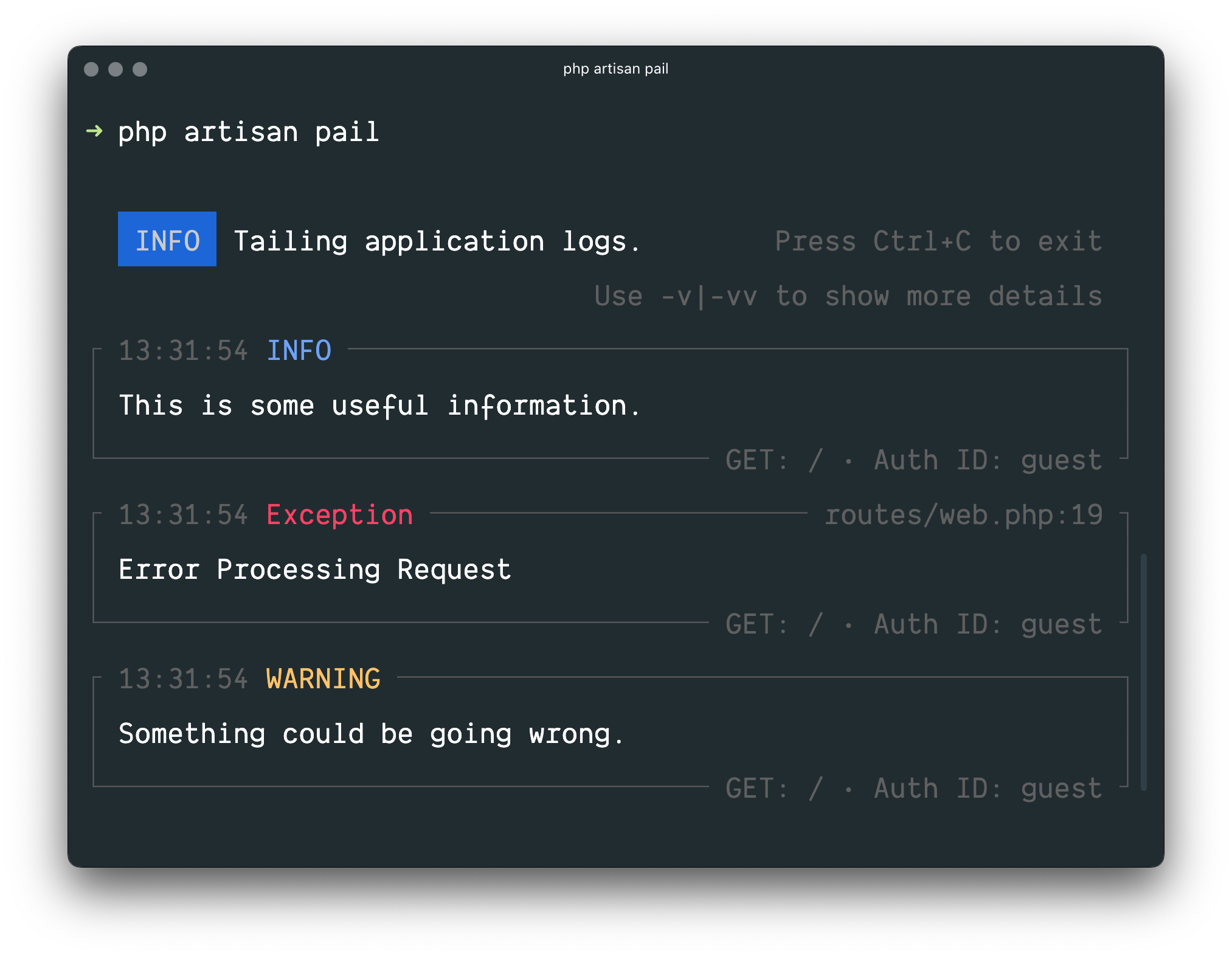
Ever found yourself in a pickle, trying to untangle the spaghetti code that is your application logs? Fear not, dear developer! With the enchanting power of Laravel’s Pail, you can now dive into your log files with ease, right from the command line! 🔍🚀
Imagine being Sherlock Holmes, and your log files are the grisly crime scene. The standard tail command is your trusty pipe, but it gets a bit too basic for this modern-day detective work, doesn’t it? Well, Pail is your new Sherlock’s magnifying glass! 🕵️♂️
Pail plays well with all the log drivers in Laravel, including the mysterious Sentry and the elusive Flare. And that’s not all! It comes equipped with a sleuth of handy filters to help you zero in on the exact piece of evidence you need to crack your case! 🔎🕵️♀️
Installing Pail: The Cinderella Story of a Package 👰👑
Just when you thought you’d need to wave your wand and perform some magic incantations, installing Pail is as easy as pie (or a simple Composer command)! 🥧✨
First, make sure you’ve got your composer ready. If not, grab that bib and bottle of milk, because it’s time to whip up a fresh developer!
composer require consoletvs/pailAnd there you have it! Your very own Pail is now ready to help you solve those pesky log mysteries! Now go forth and uncover the truth hidden within your application logs! 🕵️♂️🚀✨
Unleashing Laravel Pail: The Fun(ctional) Way! 🥄✨
Attention, coders and jokers alike! 📣
Laravel’s newest recruit, Pail (short for “Process Control Utilities Library”), is a PHP extension superhero ready to save the day! But before we invite him to the party, there’s a small house rule: PCNTL (that’s short for “Philosophers Can’t Neglect Their Libraries”) must be present at your PHP gathering. Fret not, it’s probably already there, chilling with your other PHP pals! 🥳
Now, let’s get this Pail-ate started! To invite Laravel’s newest guest to your project, fire up your Composer package manager and issue the following command:
composer require --dev laravel/pailAnd voila! 🎉🎊 You’ve just brought a new friend to help make your Laravel projects smoother than a pancake flipper on a lazy Sunday morning. Now, let’s see what else Pail can do with all this extra free time… 👀
📝 P.S.: If you’re interested in learning more about our new pal Pail, jump to the Pail Usage section below! 🤓💬
Alrighty, let’s get this log party started! 🎉📝
To begin, simply summon the almighty pail command:
php artisan pailWant more details than a simple “Hello World”? Increase the chatter with the -v option (don’t worry, we won’t ghost you):
php artisan pail -vIf you’re feeling particularly verbose or need help debugging an error that’s giving you grief, bring out the big guns with -vv:
php artisan pail -vvRemember, no one likes a clinger. To end your log love affair at any time, just press Ctrl+C. Don’t worry, it won’t feel awkward because logs are known to be antisocial beings 😉
Now, if you’re tired of sifting through endless log entries like a miner panning for gold (but with less glitter), we’ve got a special treat for you. You can filter logs using our state-of-the-art Log Filtering Technology™. Stay tuned for more exciting features! 🌟✨
Unleashing Your Inner Sherlock: A Guide to Decoding Laravel’s Mysterious Log Files
Welcome, detective! Today we’re diving into the realm of log files, where data clues are hidden in plain sight. You know the drill - when something goes awry in your Laravel app, you don’t call the ghostbusters, you consult the logs! 🕵️♂️
Filtering Options: The Magical Lens for Log Decryption
In every detective story, our hero needs the right tools to uncover the truth. In your quest for app debugging, that tool is the filter option. This humble yet powerful feature allows you to sift through the log chaos and focus on the breadcrumbs that matter most! 🧩
To filter logs by a specific keyword, simply append -q=your_keyword to your URL:
http://localhost:8000?filter=-q=your_keywordAnd there you have it, detective! With this secret weapon at your disposal, Laravel’s log files will never again be a mysterious maze of data. Happy debugging! 🎉🕵️♂️💻
Ahoy there, captain! It’s time to sail the seas of your terminal logs with the --filter anchor! This nifty little command lets you sift through those chaotic, swashbuckling log entries like a seasoned seafarer, seeking out specific treasures.
Let’s say ye be after the elusive QueryException, shall we? Well then, hoist the mainsail and set course with this command:
php artisan pail --filter="QueryException"Now, hold on tight, matey! Your ship is about to be flooded with only the finest logs of QueryException - just like a pirate’s chest full of doubloons! Arrgh!
Ahoy there, log enthusiasts! Ever found yourself drowning in a sea of server chatter, yearning for that one pearl of wisdom hidden among the barnacles? Fear not, dear friend! Laravel’s pail command has come to your rescue with a nifty little option called --message.
Imagine you’re on a quest for the elusive “User created” log entry in a castle full of logs. Instead of painstakingly sifting through each one (we’ve all been there, right?), just shout out this enchanted command:
php artisan pail --message="User created"In no time, your terminal will present you with the log entry you’ve been seeking like a loyal squire revealing a hidden treasure map. Now isn’t that grand? So go forth and conquer those logs without breaking a sweat!
P.S.: If you ever need to filter logs by their level (like error, info, debug, and so on), remember to cast your gaze upon the “Filtering Logs by Level” section further down in thesedocs. That’s like upgrading from a peashooter to a flamethrower when it comes to log hunting!
Alright, Laravel enthusiasts! Fancy a log party but only with the juicy bits? Enter the --level option, your VIP pass to a world of filtered logs! 🎉
Imagine being at Coachella, but instead of indie rock tunes, you’re grooving to the rhythm of your app’s errors, warnings, or whatever tickles your fancy. Here’s how you dial in:
php artisan pail --level=error 🎤(mic drop)And just like that, you’ve filtered the logs so hard only error messages are left standing (and possibly some dramatic silence). But hey, it’s all about the drama, right? 💥🌪️🌋
Now, where did I leave my sunglasses and unicorn floaties? Time to get this party started! 🎉🌈🚀🚀
Ahoy there, log enthusiasts! m (that’s “logger” backwards, we like our fun here)! Let’s embark on a swashbuckling adventure through the mystical realm of your Laravel logs, shall we?
But before we set sail, gather ‘round, ye hearty souls! If you’re yearning to unearth logs penned whilst a certain user was authenticated (aargh, I know, it’s like trying to find a needle in a haystack, but stick with me), there be a simple remedy!
Just whip out yer trusty terminal, and summon the mighty pail command with an offering of the user’s ID:
php artisan pail --user=1Now, you can rest easy knowing that only logs from ol’ One-Eye Pete (or whichever numbered pirate corresponds to your user ID) will be revealed in all their glory. Yarr, it doesn’t get much simpler than that, matey! 🤝🏼🏴☠️